YOLO Deploying to Production
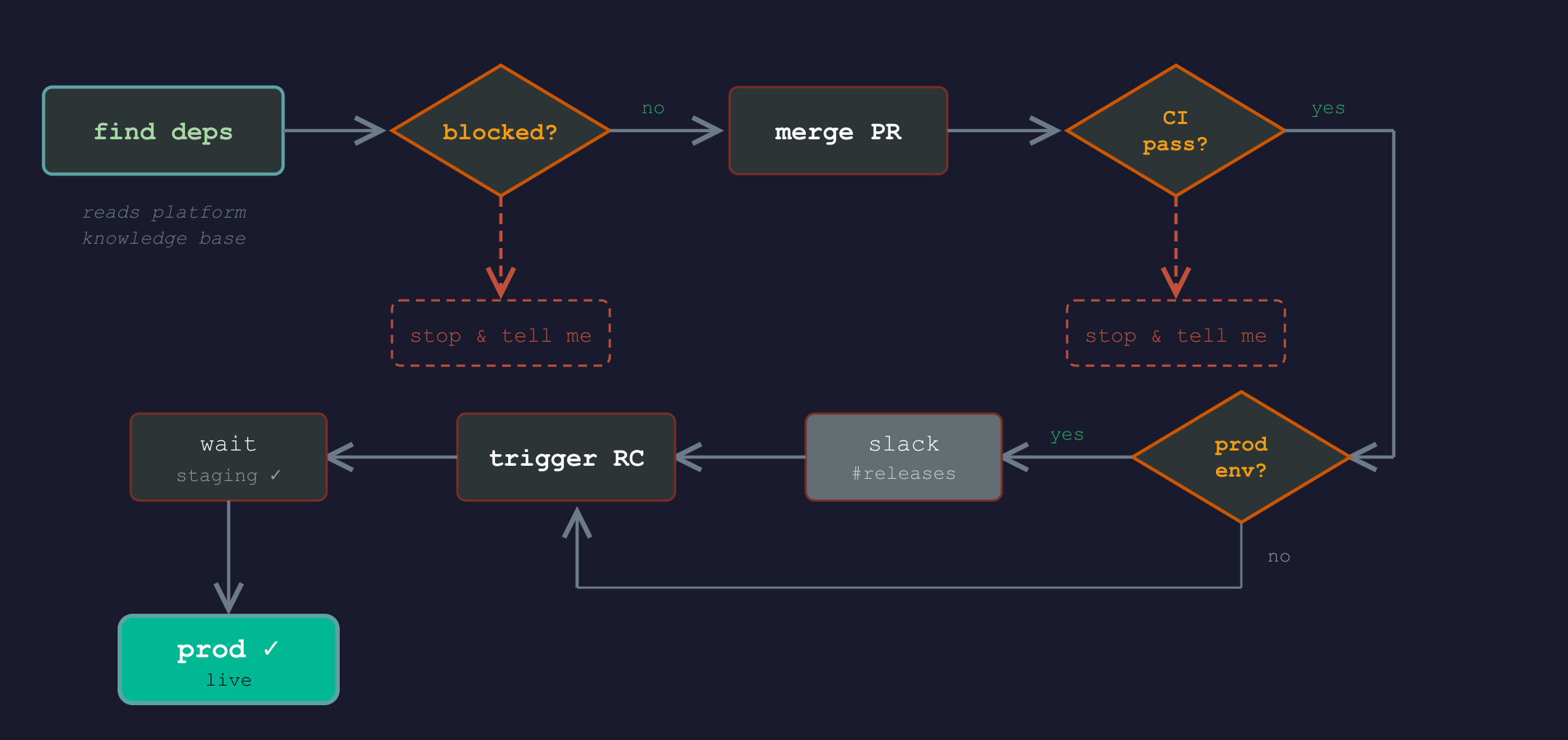
For the last 3 months I’ve been deploying to production hands-off. I would hand a PR or ticket number to a Claude Code skill I created, tell it which environment, and proudly go to make coffee and brag about how Son of Anton is deploying the work for me (if you didn’t watch Silicon Valley we can’t be friends). I have never been so happy.
The best part is how easy it is
I give it a PR number (or a ticket) and a target environment. Then it does what I did a gazillion times already by hand, except it doesn’t forget steps or screw with the release type. These are roughly the steps:
-
Finds dependencies — figures out if anything else needs to deploy together, even across different repos. It knows this because I built a knowledge base documenting how all our platform services connect — which repos depend on which, what order things need to go out. The agent reads that and handles linked deployments in the right order.
-
Checks for blockers — looks at what’s on master that hasn’t been deployed yet. If someone else’s commits are sitting there, it stops and tells me so I can follow up with whoever owns them.
-
Merges the PR — if all gates are green and PM has approved the work, it triggers the merge. No manual clicking through GitHub’s UI.
-
Waits for CI — Monitors the build workflow on master until it passes. If it fails, it stops and tells me, so I can decide the next step.
-
Slack notification — if I’m releasing to production, it posts in the release channel. Repo name, version number, and the list of commits going out. So the team knows before anything hits prod.
-
Triggers the release candidate — kicks off the RC workflow, which bumps the version and deploys to staging. Then waits again.
-
Promotes to production — takes the RC tag and triggers the release workflow. Watches it until it’s done.
The same steps I used to do by hand through GitHub’s UI, some times messing up on complex releases because I’d get the order or projects to deploy wrong, miss a dependency, or the whole thing would take hours because I forgot some mid-step pipeline was still running — until PM asks “hey, is that deployed yet?” and I realize I never triggered the next step.
The skill is also structured in a way that any fragment of the process can run upon request. For instance I can take a Ticket that is already merged and deploy it only to staging, in which case the Slack message is not sent, since only production releases are announced.
But what’s really going on?
The skill is a markdown file —duh!— that describes this process. It tells the agent which gh CLI commands to run, in what order, and when to stop and wait. Take for instance the RC step:
gh workflow run release-candidate.yml \
  -R org/repo \
  --field "title=<DESCRIPTIVE_TITLE>" \
  --field "release-type=minor (1.0.0 -> 1.1.0)" \
  --field "commitish=master"
Then the agent watches the run:
gh run list --workflow release-candidate.yml -R org/repo --limit 1
gh run watch <RC_RUN_ID> -R org/repo --exit-status 2>&1 | tail -5
No black magic is taking place. It’s simply calling gh the same way I’d click through GitHub’s UI. The agent follows the runbook uninterrupted and I get to do something else, … or just relax.
Skill building approach
I didn’t write the gh commands myself. I documented our deployment process in plain English — “merge the PR, wait for the build, post in Slack, trigger the RC, promote to prod” — and asked Claude to figure out the actual API/gh calls and “remember” them in the skill file.
It looked at our GitHub workflows, found the right dispatch parameters, and wrote the skill. I give the agent question and a list of requirements, and I let it figure out the rest.
Make your own
The skill itself is specific to my repos, so sharing it wouldn’t help you. But you can build your own in maybe 30 minutes:
- Document the steps you follow when you deploy. Not the commands — just the process. Which things happen in what order, what you wait for, who you notify.
- Hand that document to the agent and ask it to figure out how to do each step — the CLI calls, the API endpoints, the MCP tools, whatever it needs.
- Put the result in a markdown file under
.claude/skills/(depends on your agent). - Run it on a staging deploy first. Watch what it does. Fix anything it gets wrong.
Here is a crazy idea: Feed this post to your agent and ask it to build the equivalent for your workflow.
I’ve used this every day for 3 months to release to production and it hasn’t failed once.